
Seedance 2.5 Flash
Describe what you want to generate
Select or drop multiple images, up to 1. JPG, PNG or WebP; 10 MB each.
Seedance 2.5 Flash
Create 4–30 second clips at 480p or 720p with Seedance 2.5 Flash.
Seedance 2.5 Flash
A rainy train approaches the platform and settles. Listen for the approach and braking. A paper boat drifts along a rainy curb. Watch the small movement and the surrounding ripples.
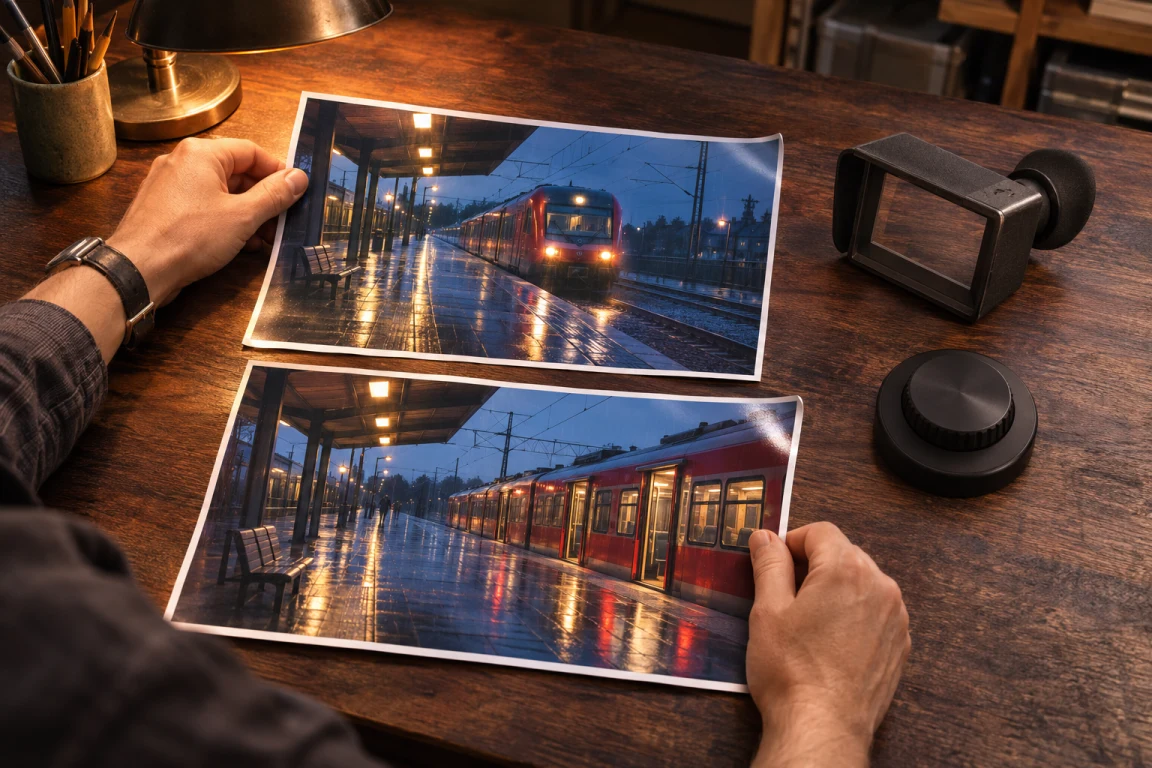
Opening and closing frame plan
The two train stills show how to plan compatible endpoints for one shot; upload only the opening frame here and describe the ending in your prompt.
Set the opening frame
With one opening image, describe what moves next. The clip follows the image’s framing.
Plan the sound
Describe ambience, a line of dialogue or a sound at a specific moment. Listen for timing when you review.
Review the take
Watch the last seconds and check framing, identity and sound before saving. Check the credit estimate before you submit.
Seedance 2.5 Flash
Choose the duration
Use 4 to 30 whole seconds. Start with a shot long enough for its main action.
Plan the sound
Audio is generated with the clip. This page accepts a prompt and an optional first frame.
Choose the resolution
Use 480p for a draft or 720p to examine more detail. The model offers those two tiers.
How to make a Seedance 2.5 Flash video
Start with a prompt
Describe one visible action, where the camera is and when the action ends.
Set the opening frame
With one opening image, describe what moves next. The clip follows the image’s framing.
Review the take
Watch the last seconds and check framing, identity and sound before saving. Check the credit estimate before you submit.
Seedance 2.5 Flash questions
Can it generate sound?
Audio is generated with the clip. This page accepts a prompt and an optional first frame.
How can I use an opening image?
With one opening image, describe what moves next. The clip follows the image’s framing.
Which resolutions are available?
Use 480p for a draft or 720p to examine more detail. The model offers those two tiers.
Seedance 2.5 Flash
Create 4–30 second clips at 480p or 720p with Seedance 2.5 Flash.